
For Retro or Link customers, using the “To Someone Else” payment feature allows you to transfer money to third parties from your 100% Offset facility* to any BSB and Bank Account from your Mobile App. Follow the steps below to learn how to transfer money using this feature.
*Payments made to a BSB and Account Number can take up to two business days.
- Tap Pay from the bottom of the dashboard.

- Choose To someone else from the options that appear.

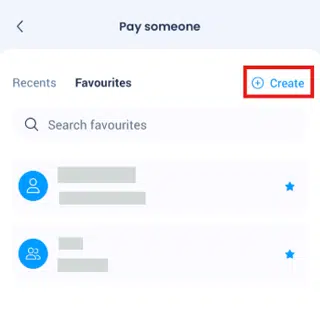
- View any existing favourites you have saved, or tap Create.
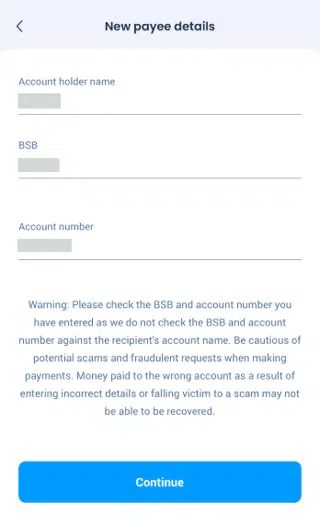
- Enter the Account name, BSB and Account Number, then tap Continue.
- Choose the account you wish to transfer from using the Pencil icon, then enter the amount and whether you wish to do it now, later, or make it a recurring payment.

- Once you are comfortable with what you have entered, tap Continue. The app will ask you to do one final check of the information, with the option to make it a favourite payee by tapping the Star icon.

- Tap Complete transfer to process the To Someone Else payment.
